01
Typed nodes, enforced contracts
Data sources, inspections, transforms, splits, features, models, and evaluations are first-class building blocks. Invalid edges are blocked before they become confusing runs.
Compose end-to-end forecasting pipelines from typed nodes. Inspect data, split safely, engineer features, train statistical, ML, and deep learning models with prediction interval controls, compare results, and export artifacts - all running on infrastructure you own.
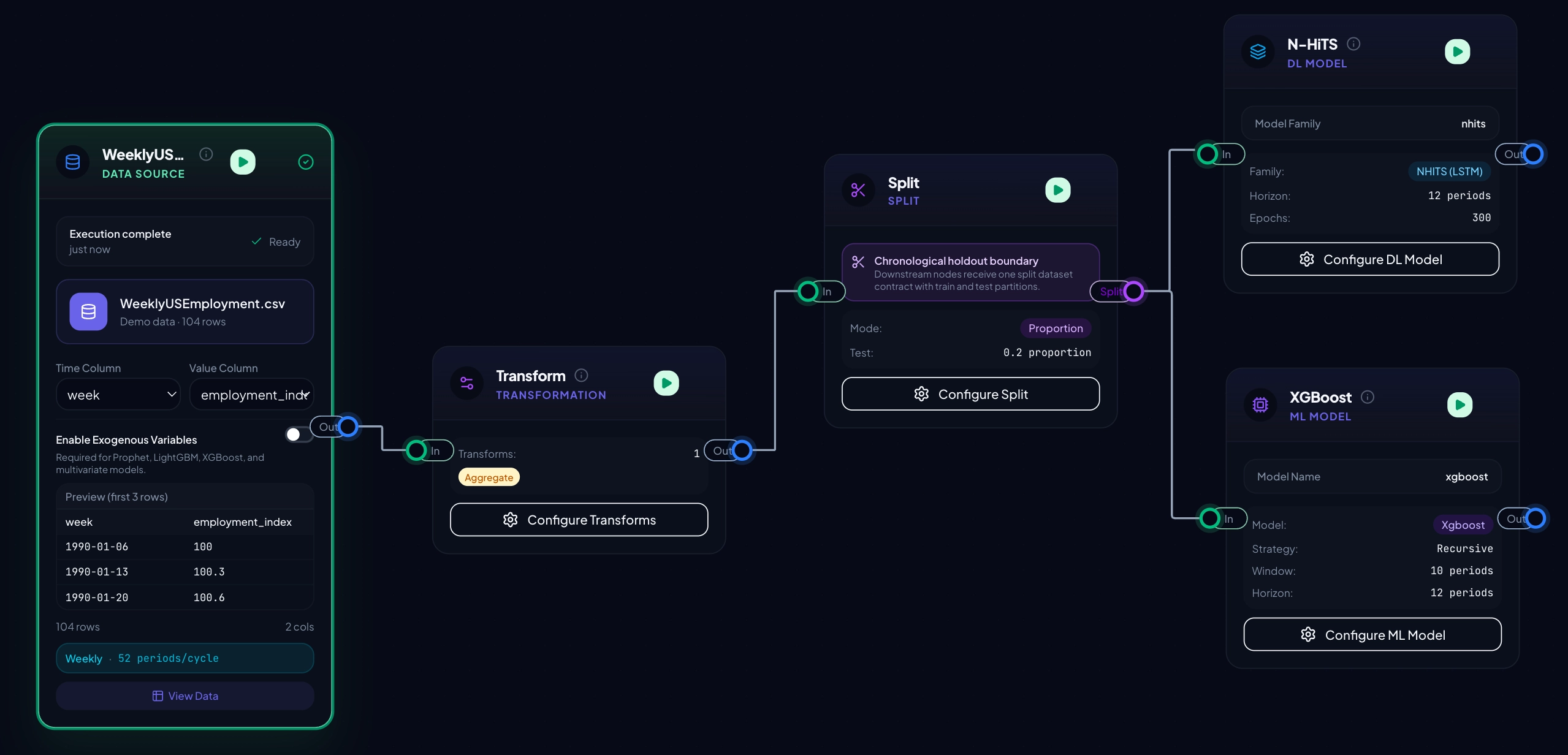
Every node is typed. Every edge enforces a contract. The canvas blocks invalid wiring, and the executor applies leakage-safe ordering for split-aware transforms and feature engineering.
Data sources, inspections, transforms, splits, features, models, and evaluations are first-class building blocks. Invalid edges are blocked before they become confusing runs.
Statistical forecasting, sktime-powered ML, and Darts deep learning live in the same graph. Prediction interval controls are available across the model families, with clear warnings when a method cannot produce usable bounds.
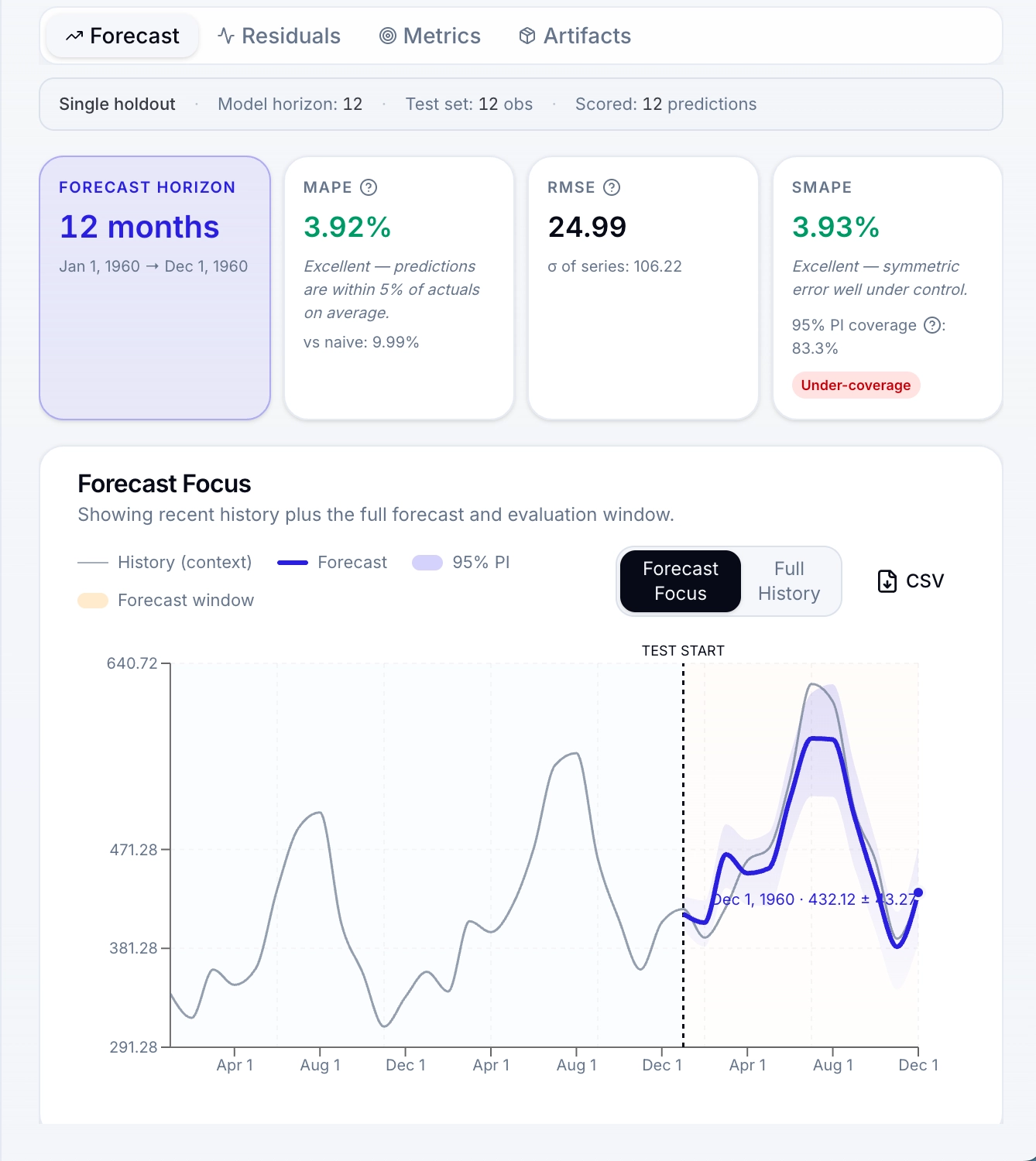
Single-holdout evaluation and walk-forward CV. SMAPE, MASE, RMSSE, mean error, residual diagnostics, PI coverage, Winkler score, horizon breakdowns, and directional accuracy.
Train competing models on the same data with identical metrics. Focused versus full-history views help teams compare forecasts without losing temporal context.
Export readable Python or notebooks, save trained models to the registry, track versions and model cards, then run inference-only or retraining workflows from the same pipeline.
Every primitive you need to take raw data to a versioned, evaluated, exported forecast. Drag any node onto the canvas, configure it, and keep the whole workflow visible.
Files, demo data, Snowflake, DuckDB/MotherDuck, Postgres.
10 tabs: quality, stats, shape, gaps, lags, outliers, ACF/PACF, seasonality, tests, decomp.
13 transforms for cleaning, filtering, aggregating, resampling, filling, and differencing.
By proportion or recent periods. Chronological.
Calendar, cyclic encoding, lags, rolling stats, holidays, interactions.
AutoARIMA, Prophet, AutoETS, AutoTheta, TBATS, DOT, Random Walk, Drift, Seasonal Naive.
Ridge, Huber, SVR, RF, GBM, HistGBM, XGBoost, LightGBM with tuning and coverage controls.
RNN, LSTM, GRU, BlockRNN, TCN, N-HiTS, N-BEATS with Optuna and probabilistic options.
Walk-forward CV across multiple time windows.
Train selected models on the same data and rank them with identical metrics.
Metric matrix, radar chart, and focused or full-history forecast overlay.
Hierarchical coherence for panel and aggregate forecasts.
Combine multiple forecasts with average, median, trimmed mean, or accuracy weighting.
Forecasts, prediction intervals, residuals, metrics, tuning history, artifacts.
Export models, forecasts, metrics, manifests, and run artifacts.
Deploy the v1.0.0 stack on a customer-owned VM with Docker Compose. PostgreSQL, Redis, FastAPI, Celery, and S3-compatible storage stay under your control.
TempusFlow uses Polars throughout the Python execution path for loading, transforming, inspecting, feature engineering, connector materialization, and artifact generation.
files / database snapshots / model results
The goal is not a synthetic speed chart. It is a repeatable execution path: source data becomes a governed dataset, the graph runs in order, and artifacts are saved with lineage.
RBAC, connection management, audit logs, a model registry, and a plugin system. The operational pieces are visible, configurable, and owned by the customer.
Manage users, groups, project membership, owner/editor/viewer roles, and per-user capability flags from the admin console.
Save trained models, track versions, inspect scores and dataset labels, and run pipelines in inference-only or retraining mode.
Add your own node types. Two reference plugins ship with the platform: Hello World and a PyOD anomaly detector.
Track pipeline runs, model registry actions, connection changes, and permission events with actor, resource, timestamp, and details.
Admins manage Snowflake, Postgres, and DuckDB/MotherDuck database connections, plus AWS S3 or S3-compatible storage for datasets and artifacts.
Run TempusFlow on infrastructure your team controls, with data, artifacts, credentials, and operational policy kept inside your environment.
Start from files, demo datasets, or approved database queries from Snowflake, DuckDB/MotherDuck, and Postgres.
Review quality warnings, ACF/PACF, stationarity tests, seasonality detection, then split and engineer features.
Choose statistical, ML, or DL models, or run several families on one canvas with tuned hyperparameters and PI settings.
Use walk-forward validation, residual diagnostics, side-by-side metrics, and comparison views to choose the strongest candidate.
Export Python or notebook code, register trained models, download forecasts and metrics, and preserve run artifacts.
Public release coming soon. TempusFlow is being prepared as a customer-owned forecasting platform for teams that need evaluated, reproducible, governable forecasts without turning every workflow into bespoke notebook glue.